Tuesday, 27 February 2018

Evaluation Question 1

In what ways does your media product use, develop or challenge forms and conventions of real media products?

https://www.youtube.com/watch?v=hlUDGPx2BSk&t=1s


Script for the video
My media product Follows the style of our chosen artist, David Bowie (In his later years) most noticeably from his work in Lazarus. We do this by using surreal imagery and connotations to keep with the same surreal themes as his video, Lazarus, which touched on the subject of death with its unique imagery. While our video wasn't a perfect representation of Bowie's style, we believe that we managed to pull off something close despite the low budget and less experience in editing and filming.

One way our video differs from usual music video conventions is by using a low quality in certain segments of the video, one noticeably being the VHS segment where I used stop motion with a VHS effect placed in the foreground. This is different from most music videos which use a HD quality throughout their entire video.

Our video also conforms to the Enigma Code Theory, by Roland Barthes, where the details of the narrative or messages are not clearly conveyed to the audience and leaves viewers to speculate and theorise their own connotations and message.

For example one segment of our music video features me and David repeating the same actions in different shots, for instance this crab shot. We also use special effects to place a low quality shot of me in Davids place, using green screen.

 I feel this suits media since it is a good way to bring communities or viewers together and makes them a part of the project as much as the developers.

However our video goes against typical conventions of other music videos by intentionally using a low video quality to add to the surreal theme we wanted to create. 

Overall I feel as though our video both conforms and goes against codes and conventions since the video links to the Enigma Code theory, which has been massively popularized in modern media and follows similar themes from a famous artist. The low quality could however be seen as intentional or just a lack of effort which isn't what we intended while creating the video.

Monday, 26 February 2018

Evaluation Question 2

How effective is the correlation between your main product and Ancillary texts?

https://www.youtube.com/watch?v=o9SxMnVeIvI&feature=youtu.be


For this question I decided to use a Green screen presentation. We had used Green screen for our Evaluation last year. I felt that using green screen is a decent way to show the viewers what I am describing in my answer and show how I can use my editing skills for my Evaluation. 

I used Sony Vegas to edit the Video and used my Phone camera to film. Editing the video was easy and quick, I was able to Film in One hour and Edit and Render the video the next hour. This shows how my skills in using this software have improved since filming my Music Video. 

Script for Green screen Video
The correlation Between my Main product and Ancillary texts is effective because I took inspiration from a key segment of my main product while creating my Digipack and Poster designs.

The theme correlating throughout my Ancillary texts is based towards this segment of my music video, which I like to call the VHS segment. As you can see the shot suits our chosen themes. This grainy, VHS style is a reoccurring theme throughout the video.

This is my Poster design, as you can see I wanted to use the same distorted Video style as the video. So I took a blank VHS background image and used that for the background. I inverted the colours of our logo and text to suit the distorted colour scheme I wanted.

This is my Digipack, as you can already see I used the same images as the poster to keep with the same themes and to link the two together,

which I believe makes them look more professional. I used Photoshop to make these images and  editied them in a way to keep with the same surreal, uncanny valley imagery as my music video. 

Overall I feel as if the correlation between my Video and Ancillary texts are effective. And I'm happy with the end result.

Sunday, 25 February 2018

Evaluation Question 3

Evaluation Question 3
What have you learned from your audience feedback?
Prezi Document
https://prezi.com/p/dmeintadr16h/

For this Evaluation question I wrote out my answer and created a Prezi document online which explained my actions based off of audience feedback, my changes from my first presentation to my last and some examples of both the positives and negatives of my music video.

I chose to do a Prezi document because it was an easy way to lay out information which is easy to navigate. This allows the reader to feel more involved in the question since my presentation follows the same themes as my video and Digipack/Poster with the VHS background and text.


Friday, 16 February 2018

Evaluation Question 4

How did you use Media Technologies in the Construction and Research, Planning and Evaluation stages?

Construction 
For my Construction stages I used different Media Technologies while creating my main product (music video)
To Film our music video I used my IPhone camera. The camera gave us shots with a good video quality and was portable since it fit easily in my pocket, this allowed me to film without having to carry around expensive equipment or borrow a decent video camera off of someone. To get shots, that needed to be perfectly still, for example our Green Screen/ Mirror segment. I used a small tripod, for a completely different camera, and tied my phone to the tripod with two hair bobbles.


For editing my Video I used a number of platforms. I used Adobe Photoshop for creating stills for our video. In one segment in particular, the VHS segment. My original intention was to create Threshold images and sync them up with the lyrics of the video to crate a stop motion animation. However the Threshold didn't look as good as I wanted it to look. So I looked for something to replace this. I then thought of using distorted VHS effects for the shot. I took images of video distortion and edited them in Photoshop to look like straight lines of distortion. This looked way better than my original plan so I decided to use this instead. 


I also used Photoshop to create a Poster and DigiPack for our music group.
For our poster I wanted to use the same themes as my video so I chose the themes of my VHS segment. I used a blank VHS background, with the play and time codes, usually found on home video cameras. I used the Logo and Title, designed by David on Photoshop, and Inverted the colours using the Invert tool. This followed the distorted theme I wanted. 


For my Digipack I used the same images as my poster, I did this to keep with the same themes as my other Ancillary texts. I got a basic template for a Digipack and used this to place my images which I designed in Photoshop. I edited one image, one of me and David, and removed our faces to keep with the surreal theme of my Video, using the Spot Healing Tool. I also used a Threshold image, of me, which I intended to use for my music video but felt that it didn't look good enough in the end. However I felt as if it suited my Digipack so I eventually found a use for this image.


To put the Video together I used Sony Vegas. with this software I was able to put together our shots, audio and create special effects for our video.

For our VHS segment I placed the stills into Sony Vegas and synced them up with the lyrics of the song. I then placed a moving image of my distortion effect in front of the stills. I then used the Add Noise tool to give the shots a fuzzy, low quality, video effect.
For our video we also used green screen in certain parts. One use of green screen was for our Mirror shot where me and David stood in front of a mirror then covered the mirror in green fabric. Then we edited the shots with the Chroma Keyer tool. Using the Layers of the video we were able to place the two shots together and ended with a shot that looked as though I was Davids reflection. We did have to re take this shot using a tripod and different mirror but the editing process was still the same.


Research
For my research I used different Media Technologies to receive information on how we could create our main product.

YouTube was a platform which we found useful in our research. On YouTube I could look at different styles of music videos from our chosen artist, David Bowie. As well as different music videos with similar styles and themes as what we wanted to convey in our music video.
Using YouTube we were also able to find different video tutorials on how to create the different effects we wanted in our video. Using YouTube videos we could pause and replay the video to follow each step and get used to the editing software. This is how I am now able to make Green Screen videos a lot easier than I could starting this project.

Google Images was useful to my research because I could look at different shots or images to get inspiration and ideas as to what I wanted to create in my music video. The VHS effect I used was an idea given to me looking at images of distorted images on Google. It was also useful for looking at images of key moments in other music videos with similar themes.


Blogger was one of the main platforms we used for our A level, we use blogger to upload our coursework but it was also a reliable source or research. We were linked to a MasterBlog, made by Ms McDonald Holmes, were she would upload work made by previous students, which I would look at to see what I could create using the software's available for us. She would also upload links to tutorials on how to use the editing software provided to us on the blog.
Wikipedia was a handy source of basic information. While not reliable as a detailed source of information it is useful for receiving the basics. For example the release dates of certain albums as well as basic info on our chosen artist, David Bowie, such as his birthday and the date of his death


Planning

Microsoft Word was a useful tool for creating planning sheets for me and David. One example was the Lyric List that we created. In this list we copied the lyrics of the song, The Man Who Sold The World, and placed boxes next to each section. In these boxes we took notes of what shots we wanted to use for certain lyrics. This was an effective way to keep track of what we were planning, what we had shot and what we needed to shoot in the future. As we finalized our video our Lyric Sheet progressively filled out, showing our development over time.


IMessage is what we used to keep in contact with one another. IMessage allows you to use the internet to send messages to each other, this is how we were able to send screenshots of certain shots or information, such as weather forecasts etc. This helped us keep in contact with each other during our planning stages. We also used Facetime a couple times to show each other what we have planned, in our own time, and make plans for our lessons in school.

Blogger was also handy for our planning stages. Mrs McDonald Holmes updated the MasterBlog frequently with information and kept giving us deadlines for our planning evidence. Keeping us busy with coursework which doubled as planning or research helped ensure that we didn't waste time.

Evaluation
For my evaluation stages I used a number of different media technologies to create my evaluation.
I used Adobe Photoshop to create any images or to save screenshots for my evaluation.
I used a Green screen to film one of my evaluation questions and then edited the video in Sony Vegas.
 
Another technology I used was Prezi to create an online presentation that was intractable. This makes the viewer feel more engaged with the presentation. It was also easy to use however its simplicity makes the document seem unprofessional, in my opinion.

Monday, 15 January 2018

Digipack and Magazine Advert

Magazine Advert

For this task we were asked to create a Digipack and a poster each. We both tried to keep with the same themes and imagery as our music video.

 For our Add I picked the VHS segment of our music video and based my poster off of this theme.
I found an image of a blank VHS background, with text around the top and bottom, to capture the grainy theme of the sequence in our video.
I used our Logo, designed by David as well as the text he used with inverted colours.
I placed a black box behind the text to keep with the grainy and low budget theme of the sequence.
Then I placed text detailing the name of the band, the album and the release date.
We chose the date of December 2017 as our release date because this is when we finished and shown our music video to the other groups.


For our Digipack I decided to keep with the same theme and imagery as the poster I designed.
I used the same VHS background as well as the same title text for the Cover.
I used the same VHS background for the back of the cover, which featured reviews of  the album from different music magazines.
I used our logo for the Fold with the same colour scheme as my Magazine Add.
I used a Threshold image, of one of our shots that we took for our music video, a close up of me which we used for our VHS segment, here we placed the names of the songs featured in the album. One image I made, for the inside of the Digipack, was an image of me and David, which we took  for our Music magazine last year.
I removed our faces using the 'spot healing tool' in Photoshop to keep with the surreal or nightmare like themes of the music video.


Monday, 18 December 2017

Group Video process

Group Video

In my group task, I had to create a music Video with David Hutchings. We had everything planned out and tried our best to make the video as efficiently as possible.

Week 1: Research and Planning

We took heavy inspiration from David Bowie, I waned to use a song that could be up for interpretation and contain a video with surreal or strange imagery.  My original Idea was to use Hurt by Nine inch Nails as our music video. We began planning and I wanted the video to touch upon heavier subjects such as depression to separate us from the other groups. However we developed this from an upsetting theme to a dream like theme. We looked at different videos and I decided we should change our song  to one by David Bowie, This is because his music videos were similar to what I had in mind, they contained dream like sequences and had an emphasis on editing. I decided the best song to use was The Man Who Sold The World, which was a personal favorite of mine and could be interpreted in different ways.

I looked at different music videos for inspiration and was most interested in videos by David Bowie and Kanye West, as well as some parts of films that suited the themes of the video.

A song from David Bowie I took inspiration from was Lazarus. The nightmarish and surreal themes contains different connotations such as death, if viewers read between the lines, and I wanted to follow this trend in my video.

We then designed storyboards which would be further developed as we continued to film.

Week 2: Filming begins

Thursday 16th November: Me and David went to Yewtree cemetery and began to film a number of basic shots. We filmed establishing shots of the scenery and close ups of some of the statues. We also filmed a lip sync of David in the cemetery. I chose the line "I gazed a gazelle stare at all the millions here" because it could be linked with the cemetery setting.


Week 3:

Saturday 25th November: I decided, to keep with the psychedelic theme of Bowie's style, and the style we wanted to follow, I wanted to create a shot where David stares into the mirror and I was his reflection. So I brought David to my house and used green fabric to cover the mirror which we would then transform into a green screen in Sony Vegas. We also shot a closeup of me lip syncing and I wanted to use this as a stop motion animation.

Week 4:

Monday 4th December: I wanted to have shots of us standing still whilst distorted images, we created, are used as backgrounds. This followed the animation and surreal theme I wanted to follow. We went down to the green screen room and took several different shots which could be placed in front of scenic shots that we have taken.

Saturday 9th December: I wanted to get more scenic shots with duller weather, to keep with the theme of the video, as well as re shoot the mirror shots, this is because they were too shaky whilst editing and we couldn't keep them in the same place, this is because we shot this by hand and without a tripod. We fixed this by attaching my phone to the only tripod we had available with hair bobbles. we also placed them on boxes and used a better mirror.
Then we went back to the cemetery where we previously filmed with the bad weather (Snow and hail) I wanted to re shoot some shots because I believed it would suit the theme of the video better and shows how we have developed our video over time.
Then we went to town to take some shots of crowds and more stills of the weather in a crowded area.


Week 5: Editing

In this week we began editing the music video, I focused mostly on the editing side of things; like creating the stop motion sequence and special effects. While David focused mostly on the group blog and paperwork; such as storyboards and planning.
For the stop motion sequence I created an effect in Sony Vegas that would cover the still of me lip syncing. I chose the style of a VHS tape, I did this to follow the gritty and surreal theme of the rest music video. I asked David to take a close up shot of him putting in a VHS tape, just to give this shot a narrative and to make this sequence make more sense. I took an image off the internet of a generic static effect, from a VHS tape, and cut out a piece of it in Photoshop, I then used a combination of green screen and animation too make it pan in front of the stills in the background.


Week 6: Presentation

Monday 18th December: I finally finished Editing our first version of the music video. I included extra shots involving green screen and added Noise to certain shots to follow the surreal, VHS theme in the video. The add noise tool makes any shot look grainy or fuzzy, looking similar to a VHS tape. The audio The audio we created for our music video was in terrible quality. This is because the audio I recorded was done by using the recorder tool on the school computer, with a YouTube video of the song playing on full volume. The internal speakers gave the song a low quality and vibrating sound throughout the song, because of the internal speakers. So I decided, when I got home, to use an mp3 converter instead, to get a higher quality, on my own PC then bring the audio file in on a pen drive the next morning then Re-render the video for our presentation.

Music Video Planning part 2

http://group-b-david-james-g324.blogspot.co.uk/2017/12/second-storyboard.html

Tuesday, 21 November 2017

Album Covers

Analysis of Album Covers

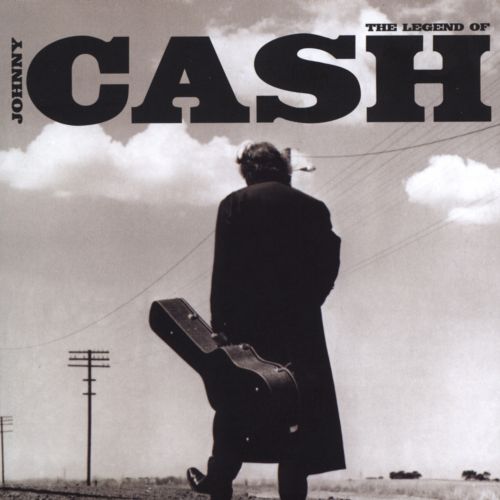
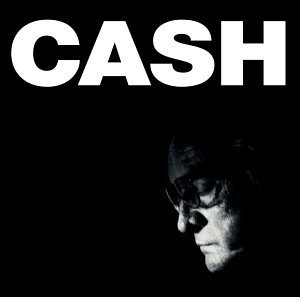
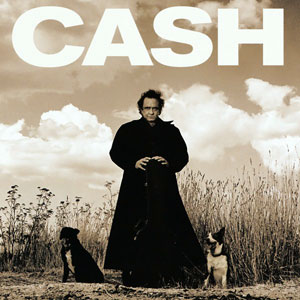
The covers by Johnny Cash have a consistency: Cash's Logo is just his second name placed as a masthead on the cover (at the top and center) he uses the same large, bold font to keep a consistency with his covers, he uses the font as his brand. His central image is usually a minimalist image of the artist, sometimes with a prop, he always uses a black and white or tinted filter to follow his theme, somber country music, his music is usually sorrowful, talking about the artists past drug addiction and felonies as well as age and the concept of death. So his covers usually follow the same dull and upsetting themes as his music.

The Legend of Johnny Cash
25 October 2005

Songs in Album: Cry! Cry! Cry!, Hey Porter, Folsom Prison Blues, I Walk The Line, Get Rhythm, Big River, Guess Things Happen That Way, Ring of Fire, Jackson, A Boy Named Sue, Sunday Mornin' Comin' Down, Man in Black, One Piece At A Time, Highwayman, The Wanderer, Delia's Gone, Rusty's Cage, I've Been Everywhere, Give My Love To Rose, The Man Comes Around, Hurt

 Related image
This was the final Johnny Cash Album, a "best of" collection, this album was created after his death in 2003. Here the CASH logo has been revamped to look more western than usual, to suit his country theme, The central image consists of the artist, holding a guitar case, walking down a desert road, most likely in Arkansas or Nashville, one of his home towns. He is walking away from the camera which denotes that the artist is walking away from the world of the living with his guitar or career/legacy.


American IV: The Man Comes Around  
 5 November 2002

Songs in this album: The Man Comes Around, Hurt, Give My Love To Rose, Bridge Over Troubled Water, I Hung My Head, First Time I Ever Saw Your Face, Personal Jesus, In My Life, Sam Hall, Danny Boy, Desperado, I'm So Lonesome I Could Cry, Tear Stained Letter, Streets Of Laredo, We'll Meet Again. 

Image result for Johnny Cash album covers

This Album was created not long before Cash's death, due to old age and complications with health, he knew he would soon die creating this album so he created this front cover to show off his old age. The central image is dark and only shows the artists face, he looks old and upset, this was done to denote the theme of death surrounding his album. The music in this album is described as being the most upsetting and was made most famous by the song Hurt, which was the last song Cash created before his death in 2002. The front cover follows the same theme as Hurt, with high emphasis on age.

American Recordings
26 April 1994

 Songs in album: Delia's Gone, Let The Train Blow The Whistle, The Beast In Me, Drive On, Why Me Lord, Thirteen, Oh Bury Me Not, Bird On A Wire, Tennessee Stud, Down There By The Train, Redemption, Like A Soldier, The Man Who Couldn't Cry.

Image result for Johnny Cash album covers

This cover for American Recordings was an older one of Cash's albums, the cover follows the same sobmer themes as most of Cash's covers, with the graney, western filter to follow his country theme. This cover denotes a theme of lonlieness. He stands alone in the desert with no one but the two dogs beside him. The cover still follows the traditional codes and conventionas as the rest of his covers; It has his signature CASH brand and has the Americsan desert themes shown in most of his covers.  

Wednesday, 8 November 2017

David Bowie (Directing his videos)

David Bowie directed his own music Videos. I was given the task of analyzing a couple of his music videos and comparing them to see if his videos follow a theme.

Ashes to Ashes:

 This shot zooms into Bowie, showing him in a padded cell, denoting that he is "Insane" and has been put in a mental hospital. This gives the video a psychedelic feel.
 A lot of Bowie's music videos had a fixation on his eyes, he would usually zoom into his eyes since they were a big part of his persona and theme. His eyes drawn the viewers in with a hypnotic feel.
 This shot establishes a drwam like world, if you look closely the characters resemble that of the characters from wizard of oz, Bowie being the Tin Man. This dream like sequence follows the psychedelic theme.

This shot zooms into Bowie, tied up to a wall of what appears to be a spaceship. This change in style only continues to denote a dream like feel to the video and grabs the viewers interest with the use of set and special effects.


Lazarus:

 This pan shot that pans up Bowie's face reveals his eyes are blindfolded and have bolts covering where his eyes usually are. This is because this was his last video, knowing that he would soon die of liver cancer, so he did this to send the connotation that his eyes are gone or lifeless or dead. This follows the reoccurring theme that his videos have a fixation on his eyes.
 This pan shot  shows a hand, from a woman lying under Bowie's bed (Death Bed) gives the video a horror or nightmare based theme. This follows his style of creating dream like music videos.
This closeup shows Bowie with his hands raised, singing with an upsetting expression. From this I receive the connotation that he is singing or Praying to the heavens, wishing to go to heaven. This shot shows Bowie in a vulnerable and weak state which was used to upset long time fans of the formally lively star and to send the message that he knew that he would soon die.


This final shot shows Bowie entering a wardrobe. This shot is used to denote a symbolism of death. The wardrobe symbolizes a coffin and Bowie leaves his fans with a final goodbye (This video) he didn't want his legacy to end without a suitable end , so he decided to finish his career by his own will. So this wardrobe symbolizes the death of his music career, to die along side the artist.

David Bowie directed his own music videos and followed a psychedelic and dream like theme with each video. He also had a reoccurring theme, the zoom into his eyes. Bowie's eyes aren't the same colour, so he wanted this to be his symbol or calling card.


Main Music Video Research part 2

http://a2-chchs-james-donovan-media-17-18.blogspot.co.uk/2017/09/jay-z-and-kanye-otis.html